Parents : Image Segmentation , Digital Image Processing
| Date and time note was created | $= dv.current().file.ctime |
| Date and time note was modified | $= dv.current().file.mtime |
Region Segmentation is used to segment the image into regions of same intensity pixels.
Two types of region segmentation
- Region Growing
- Region Splitting and Merging.
Region Growing
Steps to do region growing on an image.
- Find the initial point/ seed value from the image from where we need to start the region growing process.
- Account for the Threshold value ‘T’ from the given image.
- Now follow the below condition for region growing.
- Mark the region with letter when above condition is followed.
- Repeat the steps 3 and 4 with the new points formed in the region by considering them as the new seed value.
- Do this until no pixel is left in the region or the image.
- After completing the procedure mark the places of the same region as ‘1’ and different region as ‘0’.
Note
- Remember to mark the region points with the letter first to avoid errors.
- Mark the region according to the connectivity condition given in the question.
- If seed value is given in the question only pick those values to grow the region and not every point which has been added to the grown region. for example if seed value is 6 and it grows into a region of 5 then we wouldn’t use 5 as the new seed value and would use the next 6 value.
Example:
- Region Growing 4-way connectivity example |noembed
- Region Growing 8-way connectivity example |noembed
Region Splitting and Merging
Steps to do splitting and merging
Here T is the threshold value taken from the image.
Splitting
- We take the maximum pixel value and minimum pixel value from the image.
- If the region follows the following condition split it into four different parts.
- Now we repeat the procedure in the split regions to split it further.
Merging
- Check the adjacent regions if they follow the following condition merge them.
- Now repeat the process until no sub-regions are left.
- Mark the combined regions using different shading to indicate the collected regions formed.
Example
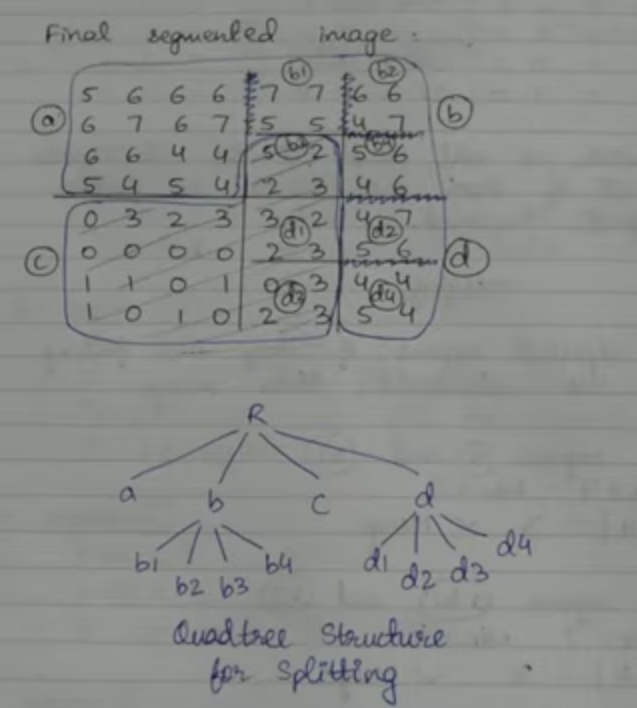
Representation of regions using the Quad Tree structure
- Represents the region as nodes
- The split regions form the children of the parent node.
Example