JSON stands for the Javascript object notation it is a data-interchainging format used for transfering information between nodes on internet. it is language independent derived from two data structures
- Object : key-value pairs
- List/Array : list of values.
Before using JSON we must convert it from string to native object form .converting a string to a native object is called deserialization, while converting a native object to a string so it can be transmitted across the network is called serialization. Ref: JSON
References
JSON Web Token
-
Learn more about JWT
-
Use case in APIs
-
a standard for information transfers between parties
-
uses JSON format for data format
-
information is signed and hence can be trusted ( signed using HMAC algorithm or using any other algorithm such RSA)
Structure of JWT
| Header | Payload | Signature |
|---|
The JWT consists of three parts :
- Header : consists of type of token and algo used to sign it. Example:
{
  "alg": "HS256",
  "typ": "JWT"
}
- Payload : This part contains of claims (info regarding user or any other additional data. Claims can be of three types : public ,private and registered. Don’t put private info here or in the header part. Example :
  "sub": "1234567890",
  "name": "John Doe",
  "admin": true
}- Signature : To create the signature part you have to take the encoded header, the encoded payload, a secret, the algorithm specified in the header and sign that. Example:
HMACSHA256(
base64UrlEncode(header) + "." +
base64UrlEncode(payload),
secret)
The complete result is Base64Url(Base64URL | Base64 Standards | Base64) encoded and generally looks like below:
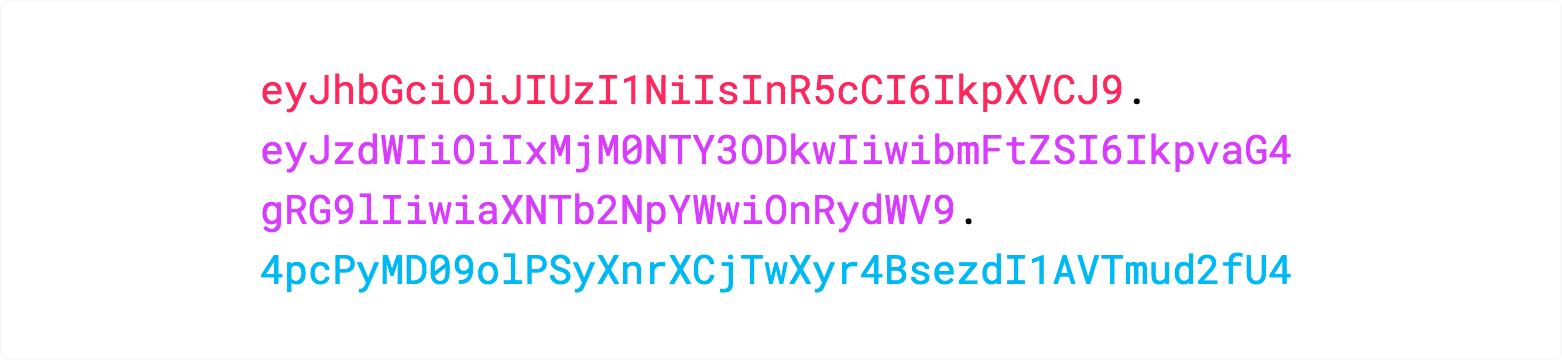 These three are separated by dots
for example: xxxxx.yyyyy.zzzzz
where x: header, y : payload , z: signature
These three are separated by dots
for example: xxxxx.yyyyy.zzzzz
where x: header, y : payload , z: signature
Ref: Decoding JWT Tokens in JavaScript: A Step-by-Step Guide without Using a Library - Decode jwt token
JWT: Ultimate How-To Guide With Best Practices In JavaScript | by Martin Novak | Better Programming