Parents : Digital Image Processing
| Date and time note was created | $= dv.current().file.ctime |
| Date and time note was modified | $= dv.current().file.mtime |
Image Enhancement can be performed in both Spatial Domain and Frequency Domain
Gray Level Or Spatial Domain Transformations/Enhancements
Point Operations
In all the below methods the L value is calculated by taking the maximum value and getting its corresponding 2^n form value.
- Digital Negative
- Thresholding
- Clipping
- Bit-plane Slicing
The image is first converted into bit format according to value of L ( gives no. of bits in each image pixel).
Divide the image into three plane slices
- Most significant plane: Matrix of most significant bits
- Center plane:Matrix of center bits
- Least Significant Plane: Matrix of least significant bits
- Intensity Level slicing
- Similar to Clipping
- Two Types
- Without background
- With Background
- Contrast Stretching
- Logarithmic transformation
- Power Law Transform
Histogram methods
Histogram Equalisation
Method for 1-D
- Find the values of PDF and CDF as follows
- Multiply CDF with L-1 or maximum value in range.
- Round off the value thus obtained and this is the new gray level
- If pixel gray values results are similar combine their frequency values to form new frequency.
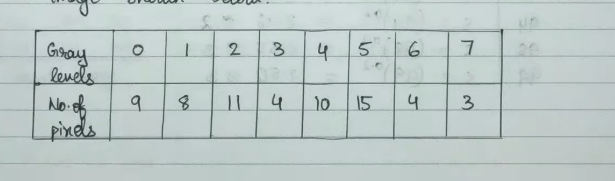
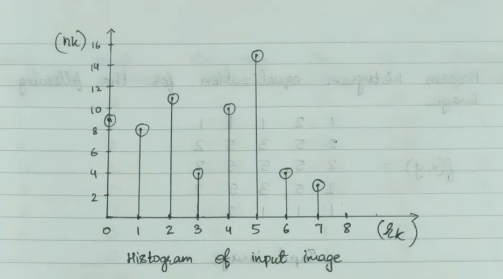
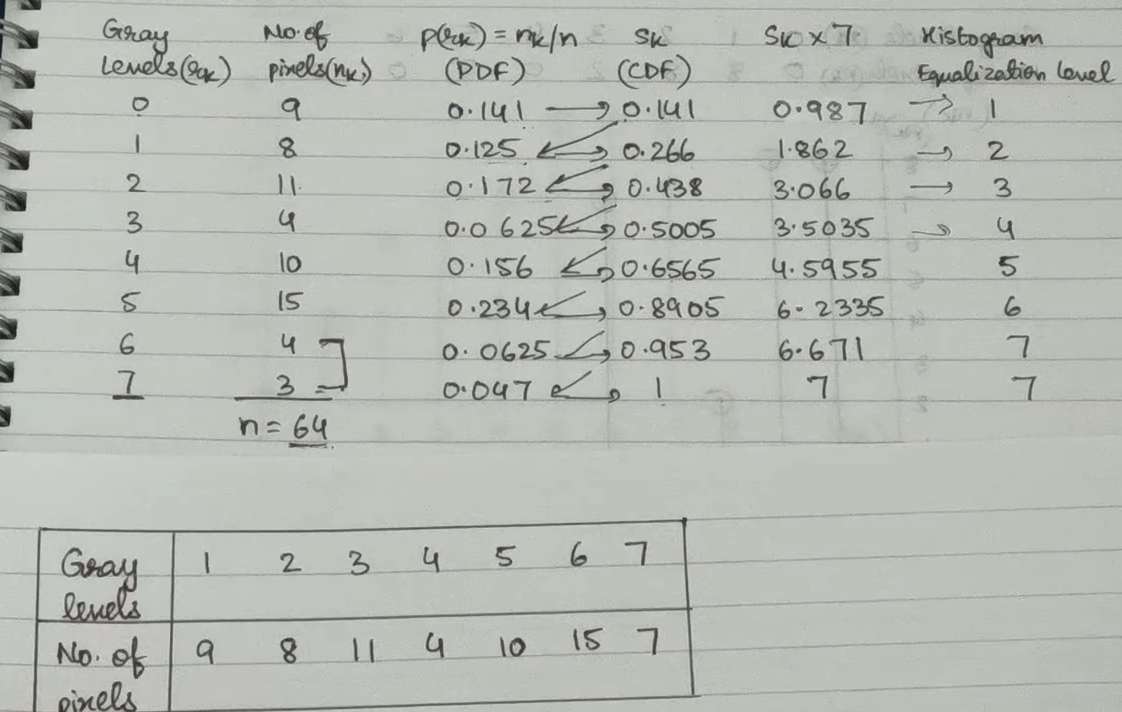
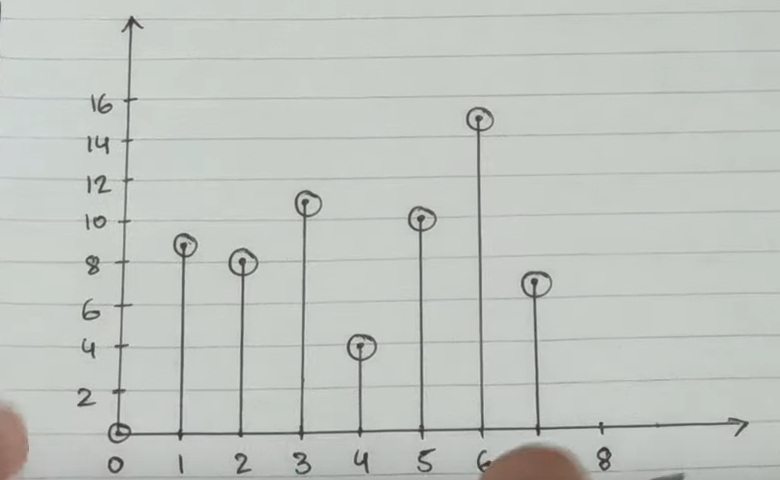
Method for 2-D
- Find the max value from the given matrix image and find the value of L corresponding to it which is a power of 2
- then the values will lie in range from 0⇐r⇐L-1
- now tabulate the frequency of this range values from the matrix given
- Procede as with the 1-D method
Histogram Specification
In this we specify one equalised histogram in terms of another equalised histogram Method
- Input: Equalise the modified from histogram and separate the gray levels and equalised values
- Process: Equalise the to be modified histogram and separate the equalised values and new frequency values in separate table.
- Map the values from the input histogram to the process histogram and place them in new table with gray values from range 0⇐ r ⇐ L-1
- Draw new histogram.
Spatial Filtering
- Convolution
- Rotate the kernel by 180 degrees
- For 1-D rotate it vertically
- For 2-D first rotate it vertically and then horizontally.
- Place above the image and then do the zero padding on each side.
- For 1-D do zero padding on right and left sides.
- For 2-D do zero padding by keeping the kernel over the image in such a way if original image is of M x N then the new image (zero padded) would be (M+(kernel_size - 1),N+kernel_size - 1) thus the number of rows and columns added are kernel_size-1
- Now at the zero padded image apply the mask/filter/kernel by multiplying the values.
- For 1-D , move the filter across image and multiply the value and write the output under the center pixel of image of the current position of the kernel.
- For 2-D , move the filter across image and multiply the values and write the output on the new image’s position where kernel’s first position was originally.
- Now move the kernel by one position and repeat the process until whole image is filtered.
- In 1-D , the old image is only used for filtering
- In 2-D , new images formed sub-subsequently are used for each next iteration.
- Now move the kernel by one position and repeat the process until whole image is filtered.
- Rotate the kernel by 180 degrees
- Co-relation
- Don’t rotate the kernel by 180 degree
- rest steps same as convolution.
Smoothing filters
- used to blur and noise reduce images
- adds/integrates the similar neighbouring pixels
- in filtering the centre pixel is the pixel that is changed.
- Blurring is the pre-processing done to focus on the object by blurring out the minimal details.
- Noise reduction can be done by both linear and non-linear filter along with blurring.
- Types of Smoothing filters
- Linear (averaging filters): As they filter on basis of average of values in the neighbour.
-
Mean/Box
-
Kernel used
1 & 1 & 1 \\ 1 & 1 & 1 \\ 1 & 1 & 1 \\ \end{bmatrix} -
Weighted Average: The greater values are near the center diverging and decreasing outwards.
-
Kernel Used Example:
1 & 2 & 1 \\ 2 & 4 & 2 \\ 1 & 2 & 1 \\ \end{bmatrix} -
Gaussian: In this a Gaussian function is used to create filters
-
Kernel Used Example:
1 & 2 & 1 \\ 2 & 4 & 2 \\ 1 & 2 & 1 \\ \end{bmatrix}
-
- Non-Linear : The response to these filters are produced by ranking of the pixels and then replacing the center pixel with value determined by ranking.
- Median
- Max
- Min
- Linear (averaging filters): As they filter on basis of average of values in the neighbour.
- Example
- Smoothing Spatial Filters in digital image processing - YouTube
Sharpening Filters
- Used for showing transitions in intensity levels
- performs reverse operations to smoothing filters
- subtracts/differentiate the surrounding neighbouring pixels
- strength of this filters is according to the intensity discontinuity
- focuses on sharp areas (high varying intensity) and not on blur areas (low varying intensity)
- Types of Filters
- Derivatives in 1-D
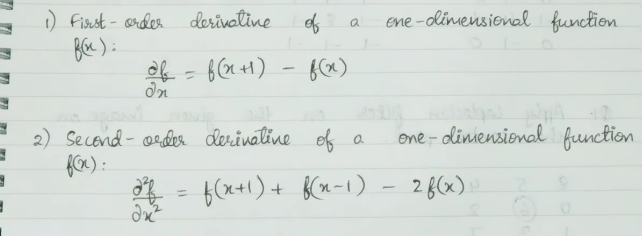
- Second Order Derivative in 2-D(Laplacian)
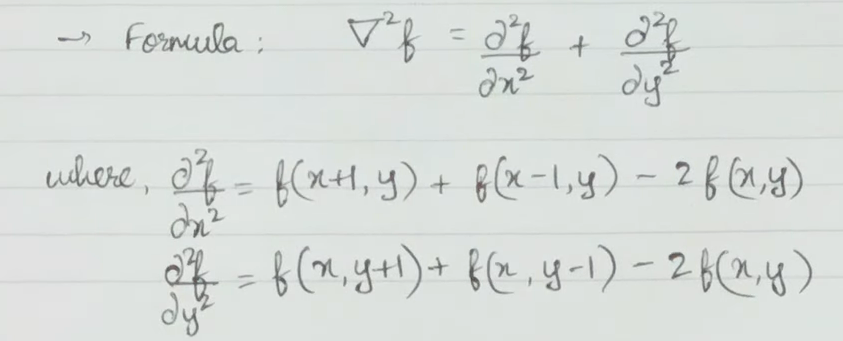
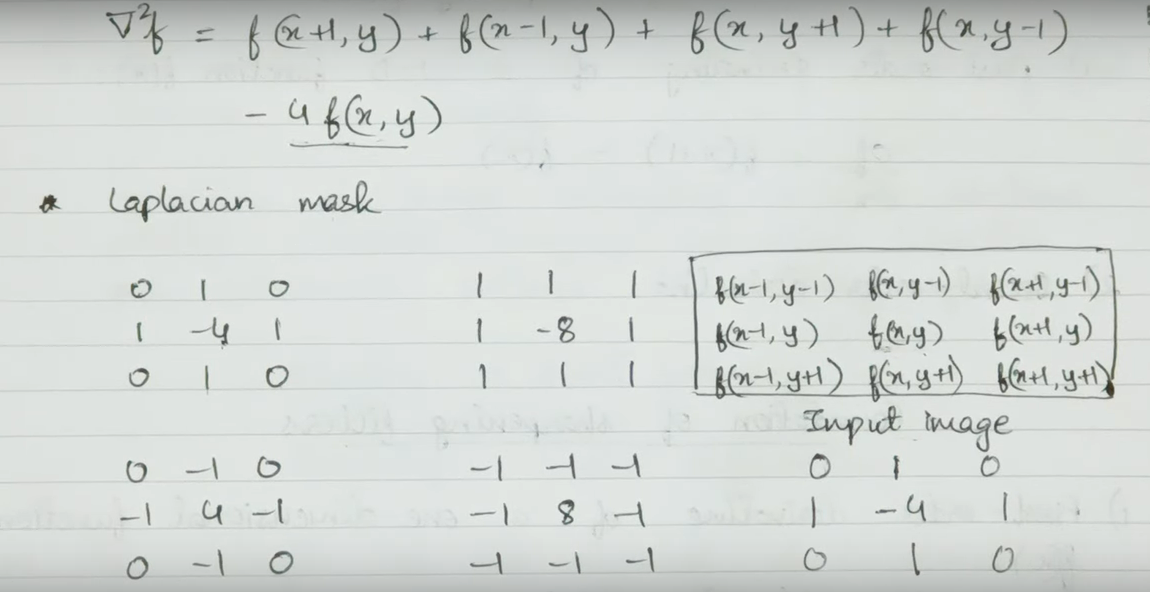
- Derivatives in 1-D
- Example Sharpening Spatial filters in digital image processing with examples - YouTube
Frequency Domain Transformations/Enhancements
In Frequency domain Transformations the image enhancements is done by first pre-processing and then transforming the image into frequency domain by use of Discrete Fourier Transform or Discrete Cosine Transform
Whole process is as follows :
- Original image (G(x,y))
- Pre-processing by moving the origin to center position by multiplying by
(-1)^(x+y)to each pixel i.e by pixel by pixel multiplication - Transform into frequency domain (DCT or DFT) →F(x,y)
- Convolution with H(x,y) by pixel by pixel multiplication
- H(x,y) is calculated by calculating the Euclidean Distance of the original filter h(x,y) points from the relocated center.
- Now inverse DCT or DFT accordingly the obtained image.
- Get real part & return origin to its original position by multiplying it with
(-1)^(x+y)by pixel by pixel multiplication
Type of Frequency domain filtering
- Smoothing filters
- Low pass filters
- Ideal Low pass
- Butter worth Low Pass
- Gaussian Low Pass
- Smoothing or blurring the image by allowing low frequency components to pass.
- Remove noise (high frequency components)
- Low pass filters
- Sharpening filters
- High pass filters
- Ideal high pass
- Butter worth Low pass
- Gaussian Low Pass
- Sharpening of the image by allowing high frequency components to pass.
- Removes Background of image.(object is of higher frequency than the background) Example: Frequency domain filtering in image processing - Low pass and High pass filters - YouTube
- High pass filters
References
- Gray level transformation in digital image processing in hindi language. Ch-1 Lecture-8 - YouTube
- Point operations in digital image processing with examples - YouTube
- Logarithmic Transformation and Power- law Transformation in digital image processing with examples - YouTube
- Fundamentals of Spatial Filtering in digital image processing - YouTube
- Smoothing Spatial Filters in digital image processing - YouTube
- Types of how we can filter the entire image
- Sharpening Spatial filters in digital image processing with examples - YouTube