Parents : Web Development
| Date and time note was created | $= dv.current().file.ctime |
| Date and time note was modified | $= dv.current().file.mtime |
Guides
- The Odin Project
- JsCafe: a great platform for watching videos and learning frontend concepts
- The GreatFrontEnd
- Front-end Job Interview Questions
- Patterns.dev - Modern Web App Design Patterns
- JavaScript Design Patterns - Dofactory
- GitHub - sadanandpai/frontend-learning-kit: Frontend tech guide and curated collection of frontend materials
- Frontend Guidelines when working in team
CSS
Learn
Cascade and Specificity
When we apply styles to our html and some styles conflict i.e. a particular style also styles the same property of the same element.
In that situation the concepts of Cascade , specificity and inheritance comes into the picture.
Cascade
STYLESHEETS CASCADE

Cascade is the algorithm that decides the way in which CSS gets applied to the element. It depends on the origin of the cascading , order of the rules , and the cascade layer in between.
when we are using the same type of selector and using different rules then the last rule will be applied at priority.
Specificity
When we use different selectors to select the element then the element whose style would be chosen depends on the specificity. Specificity is the measure of how specific a selector’s selection is.
Two types of selectors
- Element Selector
- less specific
- selects all elements
- pseudo elements have same specificity as regular element selectors
- less weight
- Class Selector
- more specific
- selects only elements with class attribute
- Attribute selectors and pseudo-classes have the same weight as class selectors.
- more weight When the above two properties together (cascade + specificity) : weight is determined which determines the selection of styles.
Inheritance
Inheritance decides whether the styles from parent are passed down to the children. Some properties inherit ( like color) some don’t (like width).
Formal definitions of each property can be found on mdn.io properties section.
Inheritance is applied based on the distance of the parent from the element
CSS Values and Units
CSS have many values associated with particular value-types. Value-types would sometimes be called as data-types.
The values held by the value-types are indicated by using angular brackets such as if <color> is used for a value then we can use any type of color may it be keyword, hex or RGB.
Values are generally of 4 types
<integer><number><dimension>: includes further categories see belowpercentage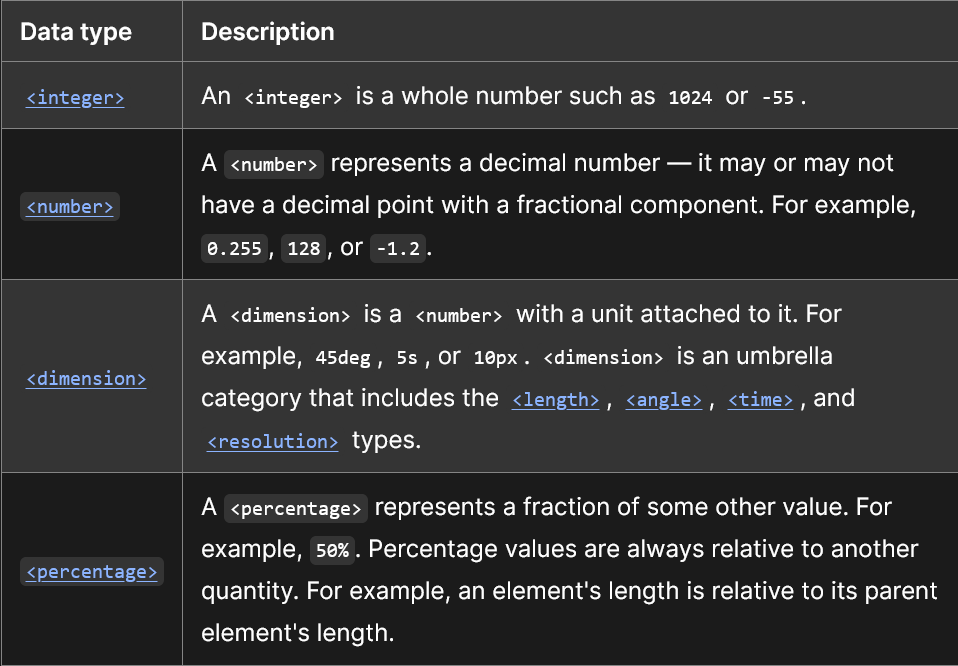
Length Values
These are the values to be dealt heavily in any CSS file (so would read them in more detail) There are two types of length values
- Absolute
- Relative
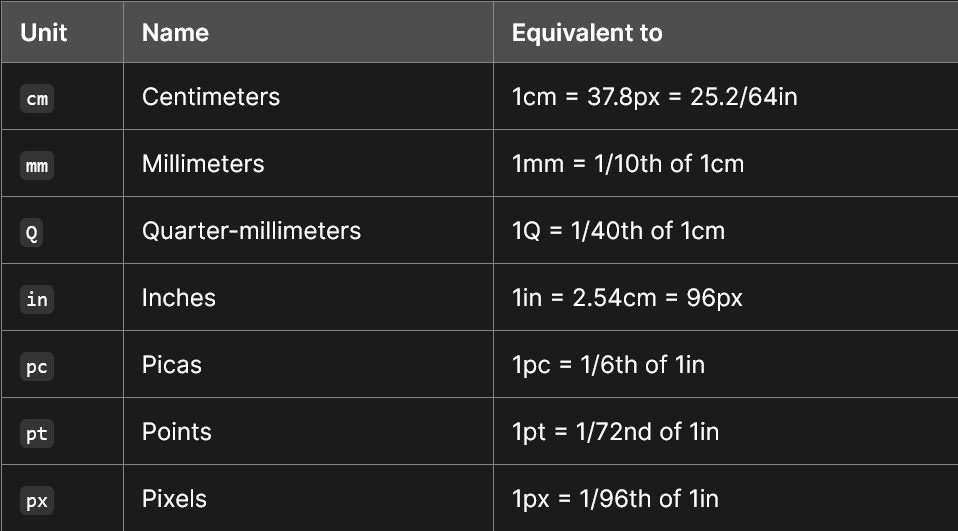
Absolute Values
These are length values that are not relative to any other value i.e. their value is independent on other values.
Relative Values
These are dependent on various factors and are dependent on others elements for their values.
em and rem
- em means my parent element’s font size and rem means root element’s font size
Flex Box
Flexbox is a layout technique used in CSS which puts the elements into space that will flex accordingly the properties given to the container they are in.
Flexbox is not a single property but a set of many properties which convey how the elements and blocks(containers) would layout in given space.
For better understanding there is not any clear distinction b/w flexbox item and flexbox container, its just a property which is relative i.e any flexbox item can also itself be a container of flexbox items but it is a flexbox item wrt to another container.
A flexbox container is an element on which
display: flexproperty is applied. See : Flex Container Properties
Practice
incomplete Implement the following as a practice to flexbox and then write the code here.
Grid
Other Concepts
- CSS makes selection in backward manner of classes i.e if body ul li {} is written it would select first all the li then ul and then would go for the body. Organizing CSS with OOCSS, SMACSS, and BEM - Matt Stauffer - YouTube
- Steps to follow for avoiding CSS Specificity incomplete issues
- Flatten selectors
- Organise your code by selecting a CSS Architecture .
- Make classes do one thing only (Single responsibility principle)
- Decouple the components into reusable parts
- Try a pre-processor like SASS
- CSS shorthand properties : Shorthand properties are CSS properties that let you set the values of multiple other CSS properties simultaneously. Using a shorthand property, you can write more concise (and often more readable) stylesheets, saving time and energy.(Shorthand properties - CSS: Cascading Style Sheets | MDN)
- FlexBox : Used for layout in form of rows and columns.
- CSS @rules : Used to tell CSS how to behave in a certain way.
- CSS Values And Units
- Cascade and Specificity
Architectures
BEM
B.E.M (Block-Element-Modifier)is a CSS architecture in which the CSS is described using three criteria.
- Block : Block represents any component that is in itself complete.
- Element : Represents a part of a block/component.
- Modifier : Used to modify the element or block in general.
- Organizing CSS with OOCSS, SMACSS, and BEM - Matt Stauffer - YouTube
- BEM 101 | CSS-Tricks - CSS-Tricks
- BEM — Introduction
Best Practices
CSS text-wrap: balance makes it easier for text to wrap in the headers
JavaScript
Concepts
Inheritance in JavaScript
Prototype
Prototype is the object in the parent class which gets inherited by child objects.
Prototypical inheritance
In JavaScript the objects inherit properties and functions from each other using prototypes. The following chain of action is usually what JavaScript follows when it finds the properties inside a object.
Check the property in the object → Not found → Check the property in the object’s prototype → Not found → Check in the parent’s prototype This Cycle repeats until it reaches the end of the so called prototypical chain or Prototypical inheritance
Notes on Syntax that follows:
- The
.prototypeproperty exists on the function from which object is being inherited only. - The
__proto__ or [[Prototype]]or value returned byObject.getPrototypeOf(name_of_specific_object)points to the.prototypeobject from which the specific object is derived from (parent object)
function Player(name, marker) {
  this.name = name;
  this.marker = marker;
  this.sayName = function () {
    console.log(this.name);
  };
}

const player1 = new Player("Prakhar", "X");
const player2 = new Player("Meru", "O");
player1.sayName(); // logs 'Prakhar'
player2.sayName(); // logs 'Meru'

// Difference Between Player Function deriving from Function.prototype and Player prototype deriving from Object.prototype
console.log(
  " Player function's prototype is derived from Object.prototype: ",
  Object.getPrototypeOf(Player) == Object.prototype
); // Returns false as the Player function is derived from Function.prototype not Object.prototype
console.log(
  " Player function's prototype is derived from Function.prototype: ",
  Object.getPrototypeOf(Player) == Function.prototype
);
//Properties from which the Player Function is deriving from which is Function.prototype
console.log(
  "Properties derived by the Player Function from Function.prototype ",
  Object.getOwnPropertyNames(Object.getPrototypeOf(Player))
);

// Necessary for inheritance
console.log(
  "Player's prototype is dervied from Object.prototype : ",
  Object.prototype == Object.getPrototypeOf(Player.prototype)
);
//Properties of the prototype from which Player.prototype is deriving from
console.log(
  "Properties derived by Player.prototype from Object.prototype",
  Object.getOwnPropertyNames(Object.getPrototypeOf(Player.prototype))
);

// As seen the Object.prototype doesn't have any of its own prototype from which it is derived from and thus returns null
console.log(
  "Object prototype's prototype from which it is derived",
  Object.getPrototypeOf(Object.prototype)
);

//Comparing the Objects created prototype with the parent object constructor prototype
console.log(
  "Is Player one's object prototype derived from Player's prototype:",
  Object.getPrototypeOf(player1) === Player.prototype
); // returns true
console.log(
  "Is Player two's object prototype derived from Player's prototype:",
  Object.getPrototypeOf(player2) === Player.prototype
); // returns true

//Some obsolete ways to do the same thing can be
// console.log(player1.__proto__===Player.prototype);
// console.log(player1.[[Prototype]]==Player.prototype);
// Describes the property's on the initital object


console.log(
  "Player Functions's Properties",
  Object.getOwnPropertyNames(Player)
); // Prints the Player functions' properties

console.log(
  "Player's Functions' Prototype's Properties ",
  Object.getOwnPropertyNames(Object.getPrototypeOf(Player))
); // Returns the Function.prototype properties

console.log(
  " Player one's Prototype's Properties ",
  Object.getOwnPropertyNames(Object.getPrototypeOf(player1))
); // That is it prints the prototype object contained in Player function.

// Describes the property's on the initital object's prototype
console.log(
  "Player's prototype Properties",
  Object.getOwnPropertyNames(Player.prototype)
);

// As can be seen there is a constructor object on the prototype
console.log(
  "Is Player constructor = its prototypes' constructor: ",
  Player == Player.prototype.constructor
); // Proves that the prototype holds a reference to the Main initial object

console.log(
  "Is Player constructor = its prototype: ",
  Player === Player.prototype
); // Proves the objects are not equal

// Attaching new function to the Player prototype so that it can be utilised by the child objects
Player.prototype.sayHello = () => `${name} says hello`;
console.log(Player.prototype); // See changes in prototype

// See changes in the properties of the [[Protototype]] in children
console.log(
  "properties of the [[Prototype]] in children",
  Object.getOwnPropertyNames(Object.getPrototypeOf(player1))
);

console.log(player1.sayHello())
Extra Gotchas
- We did
Object.getPrototypeOf(Player.prototypes)instead ofObject.getPrototypeOf(Player)because we are concerned with the inheritance of the objects which we derived from the Parent object Player. - If we had calculated the
Object.getPrototypeOf(Player), that would return the prototype of the the Player Function itself which would be[[Function Prototype]] or Function.prototypeas each function’s prototype in JavaScript derives from the the[[Function Prototype]]and in similar way forObject.getPrototypeOf(Player.prototypes)it derives from[[Object Prototype]] or Object.prototype
Related
- Prototypical Inheritance cheatsheet By Prakhar Garg
- javascript - Object.getPrototypeOf() vs .prototype - Stack Overflow
- Objects and Object Constructors | The Odin Project
Function invocation in JavaScript
The function invocation is often an important though confusing subject in javascript Through the javascript spec we can learn about function invocation and also a enormously confusing meaning of “this” in javascript In other programming languages like Java , the meaning of “this” is quite clear as the value of this is directly bound to the object being considered. But in javascript the value of this can be variant in different variations.
JavaScript Functions
- JavaScript functions are declared with function keyword.
- JavaScript functions can take default values for parameters/arguments.
- this default value can be a value or can be expression of some form
- It can be also a function returning a value.
- return can be used without any value : causes immediate exit from the program and return undefined. explore
- Functions in JavaScript is a value representing an action (basically they can be treated as variables)
- Can be used in form of expressions such as they can be used in assignments,put as arguments to another functions (See: Function Callbacks) incomplete.
- See difference with JavaScript Function Expression
- A Function Declaration can be called earlier than it is defined.
- In strict mode, when a Function Declaration is within a code block, it’s visible everywhere inside that block. But not outside of it. explore
 function showMessage(text){
	 console.log(text)
 }
 showMessage('Prakhar');
When to use JavaScript Function Expression and When to use JavaScript Functions
- When code readability is concerned use JavaScript Functions.
- When we want availability outside of block scopes than use Function Expressions.
See More About Certain Other topics related to Functions : JavaScript Arrow Functions,JavaScript Call Stack
- Functions
- Function expressions
- Arrow functions, the basics
- JavaScript Call Stack
- Function Callbacks
- Understanding JavaScript Function Invocation and “this”
Destructuring in JavaScript
Destructuring is a way to unpack properties of objects and elements of array.
Think of destructuring as copying the values out of the object into separate variables. The relationship between the original object and the destructured variables is cut off.
//Before destructuring:
const person = { name: 'Alice', age: 25 };

//After destructuring:
const { name, age } = person;
// `name` is now just a standalone variable with the value 'Alice'
// `age` is now just a standalone variable with the value 25
The case of it loosing the relationship with original object can be seen from Case of READONLY while destructuring props in React
Debugging in JavaScript
- Say no to console.log! - DEV Community
- Use different forms of console functions for different use case some of the more prominent ones to use are
- console.dir : Represent the arrays and objects as list of items.
- console.table : Represent the data from objects in form of table.
- console.group : Group the console functions’ outputs so that its more clearly re-presentable.
- console.time & console.timeEnd : For calculating time between occurrence of events
- console.clear
- Put a
console.trace()within aconsole.group(). This will let you provide identifying information at the group label, and be able to open the group to get to the detailed trace information without it blowing up the console.
- Use different forms of console functions for different use case some of the more prominent ones to use are
Lexical Scoping
- what is lexical scope
- What is a function factory ?
- project idea : keyboard visualiser (animated keypress and keycode and ascii related to it)
- Closure Scope chain
In javascript the closures are formed whenever a function is created that is its surrounding environment (outside function))is taken along with its own local scope(inside function).

The Solution to the closure problem :
Creating a closure factory
// This function creates a callback function that displays help text when called.
function makeHelpCallback(help) {
  // The returned callback function shows the help text using the `showHelp` function.
  return function() {
    showHelp(help);
  };
}

// This function sets up help text for specific form fields.
function setupHelp() {
  // An array of objects that map field IDs to their corresponding help text.
  var helpText = [
    {'id': 'email', 'help': 'Your e-mail address'},
    {'id': 'name', 'help': 'Your full name'},
    {'id': 'age', 'help': 'Your age (you must be over 16)'}
  ];

  // Loop through the helpText array to set up event handlers for each field.
  for (var i = 0; i < helpText.length; i++) {
    var item = helpText[i];
    // Get the DOM element with the specified ID (e.g., 'email', 'name', 'age').
    var field = document.getElementById(item.id);

    // Attach an event handler to the 'onfocus' event of the field.
    // When the field is focused (clicked or selected), the callback function is called.
    // The callback function is created using makeHelpCallback and is specific to each field's help text.
    field.onfocus = makeHelpCallback(item.help);
  }
}

// Call the setupHelp function to set up the help text for the specified form fields.
setupHelp();
In the provided code, the makeHelpCallback function is a closure factory. It plays a crucial role in creating a new lexical environment for each iteration of the loop in the setupHelp function. Here’s how it works:
-
When the
setupHelpfunction is called, a new lexical environment is created for it. This environment includes variables likehelpText,i,item, andfield. -
Inside the
forloop, for each iteration, a new objectitemis created based on the current element of thehelpTextarray. This object contains theidandhelpproperties. -
The
fieldvariable is created by usingdocument.getElementById(item.id). This line fetches the DOM element with the specifiedidattribute, creating a reference to that element in the current lexical environment. -
The most critical part is the assignment of the
onfocusevent handler:field.onfocus = makeHelpCallback(item.help);. Here’s what happens:a.
makeHelpCallback(item.help)is called immediately. This creates a new lexical environment for themakeHelpCallbackfunction, with its ownhelpparameter.b. Inside the
makeHelpCallbackfunction, a new anonymous function is created and returned. This anonymous function closes over thehelpparameter and theshowHelpfunction.c. The returned anonymous function is assigned as the
onfocusevent handler for the currentfieldelement. -
Since each iteration of the loop creates a new lexical environment for the
makeHelpCallbackfunction, thehelpparameter inside this function is different for each field. This means that when theonfocusevent occurs on a specific field, it will call the correct closure created for that field’shelptext.
In summary, the makeHelpCallback function is essential for creating closures that capture the correct help text for each field. Without it, the onfocus event handlers would not have access to the specific help text associated with each field, and you wouldn’t be able to display the correct help messages.
Creating closure using IIFE
Let me explain in more detail how an Immediately Invoked Function Expression (IIFE) creates a new scope for each value of i in a loop and ensures that each closure captures the correct value.
In JavaScript, variables declared with var have function-level scope, which means they are scoped to the nearest enclosing function, not the block. When you use var inside a loop, such as a for loop, the variable is effectively scoped to the entire function, not just the loop body. This can lead to unexpected behavior when closures capture the same variable.
Let’s revisit the problematic code:
for (var i = 0; i < 5; i++) {
  setTimeout(function() {
    console.log(i);
  }, 1000);
}
In this code, the setTimeout function captures the reference to the variable i. However, by the time the timeouts execute, the loop has completed, and i has a final value of 5. So, all the closures log 5.
Now, let’s use an IIFE to create a new scope for each value of i:
for (var i = 0; i < 5; i++) {
  (function(j) {
    setTimeout(function() {
      console.log(j);
    }, 1000);
  })(i);
}
Here’s how it works:
- The IIFE
(function(j) { ... })(i)is immediately invoked for each iteration of the loop. - The parameter
jin the IIFE’s function signature acts as a local variable in the IIFE’s scope. - Inside the IIFE,
jis assigned the current value ofifor that iteration. - The
setTimeoutfunction within the IIFE captures the reference to the local variablej, which is specific to that iteration. - As a result, when the timeouts execute, each closure logs the correct value of
jfor its respective iteration.
In essence, the IIFE creates a new scope for each iteration of the loop, and within that scope, it captures the current value of i as j. This ensures that each closure in the setTimeout function captures a unique reference to j, preventing the common closure-related issue seen in the original code.
for (var i = 0; i < helpText.length; i++) {
  (function(item) {
    document.getElementById(item.id).onclick = function() {
      console.log(item);
    };
  })(helpText[i]);
}
- **Using let for creating variables : **
for (let i = 0; i < helpText.length; i++) {
  console.log(i);
  let item = helpText[i];
  document.getElementById(item.id).onfocus = function() {
    console.log(item);
    showHelp(item.help);
  };
}
Modules
- I.I.F.E pattern
ECMAScript Module
- should have proper order of script tags with type module in both export and import files.
- should be imported with
.jsextension - should be imported at top of the file
- Global variables and JavaScript modules | by Marian Čaikovski | CodeX | Medium
- Global variables and JavaScript modules | by Marian Čaikovski | CodeX | Medium
- Export and Import
Document Object Model
Document Object Model long for DOM is the dynamic parsed HTML that is loaded by the browser.
References
- How I structure my JavaScript projects in 2022 | Go Make Things
- JavaScript Module Pattern: In-Depth*
Typescript
Some features of TS
- Type annotations
- Structural typing
Structural Typing
Structural typing, also known as duck typing, is a type system used in languages like TypeScript. In structural typing, the compatibility of types is determined by the structure or shape of the types rather than their explicit declarations. If two types have the same structure, they are considered compatible, regardless of whether they are explicitly related.
Here’s an example in TypeScript to illustrate structural typing:
// Define two interfaces
interface Point2D {
    x: number;
    y: number;
}

interface Point3D {
    x: number;
    y: number;
    z: number;
}

// Function that takes a Point2D parameter
function printPoint2D(point: Point2D) {
    console.log(`Point: (${point.x}, ${point.y})`);
}

// Create a Point3D object
const point3D: Point3D = { x: 10, y: 20, z: 30 };

// Even though point3D is a Point3D, it has the same structure as Point2D
printPoint2D(point3D); // This works!
In this example:
- We have two interfaces
Point2DandPoint3D, representing 2D and 3D points, respectively. - There is a function
printPoint2Dthat takes aPoint2Dparameter and prints its coordinates. - Despite
point3Dbeing declared as aPoint3D, it can still be passed toprintPoint2Dbecause it has the same structure asPoint2D(it hasxandyproperties). This demonstrates structural typing - compatibility is based on the shape of the object rather than its explicit type.
Type inference
The types can be inferred from the parameters or the return value or the value associated with the variables.
Type Erasure
When in runtime after compilation the types are removed from the code and transpiled into javascript.
Advantages of learning Typescript
- Type checks avoids runtime errors
- Avoids writing to many tasks
- Type annotation provides a code-level-documentation
- Typescript also makes it easier to work with Intellisense
The static code analysis warns you about any errors in your code, and IntelliSense can give you hints about available properties and even possible refactoring options. The code-level documentation helps you understand the existing code. With the help of TypeScript, it is also very easy to start using the newest JavaScript language features at an early stage just by altering its configuration.
Disadvantages/ some common flaws that can occur with TS
- It solves errors at compile time but not at runtime.
- Sometimes extra type checks have to be applied to get type inference to work right
- The errors produced are sometimes confusing and ambigious. (Read the Code from bottom of the error to better realise the error).
Setup Typescript
To setup typescript you can either do it globally or locally using npm project method and then run the dependencies through npm scripts
Both Commands :
npm install --location=global ts-node typescript // for installing globally

// For installing locally

// first initialise the npm project

npm init

// Second install dependencies

npm install --save-dev ts-node typescript


// Setup scripts to run the dependencies

{
  // ..
  "scripts": {
    "ts-node": "ts-node"
  },
  // ..
}

// If you need to give some options to the script  use `--`

npm run ts-node file.ts -- -s --someoption
Primitives Types
User Created Types
Union can be used to combine the values that can be used as types
To create a union type keyword is used.
Narrowing : When the type is union it can’t directly use the functions that are defined in a single datatype so to use single type functions from union we have to narrow it to single type using if else
Type Alias
To re-use type create a type-alias as follows
type variableName= variableValue1 | variableValue2 | variableValue3;
// or you can just make them based out of other primitive as well as user built ones

type variableName= string | User; // where User is a custom data type which might look as explained in the future interface example
Interface Type
-
To create custom data types we can use basically the interface data-type too.
Why you should not destructure while making a readonly object in typescript ?
Destructuring an object creates a copy of the variable and hence the property
Code Examples
import React from 'react'

export function UnsoundComponentWithTSErrors(
    props: Readonly<{
        children: React.ReactNode
    }>
) {
    // @ts-expect-error Cannot assign to 'children' because it is a read-only property.(remove this before running)
    props.children = 1

    return (
        <html lang="en">
            <body>{props.children}</body>
        </html>
    )
}

function UnsoundComponentWithoutTSErrors(props: { children: React.ReactNode }) {
    // TypeScript does not complain
    props.children = 1

    return (
        <html lang="en">
            <body>{props.children}</body>
        </html>
    )
}
interface Props {
name: string;
}
function Component(props: Readonly<Props>) {
// Direct access through props: name is readonly
props.name = 'Bob'; // ❌ Error: Cannot assign to 'name' because it is a read-only property
// Destructuring props
const { name } = props;
// Now, name is just a regular variable, not connected to the readonly props
name = 'Bob'; // ✅ No error here because `name` is a local variable
}React
Concepts
- Controlled form vs uncontrolled form in React.js
- Controlled forms give the state the control of the forms while the uncontrolled forms are controlled by raw html to control the values in the form
- It is important to note that uncontrolled forms should be used for simple forms that do not require advanced functionality such as real-time validation or tracking changes made by the user.
- Form Handling in React
- Refactoring a React component - Design Patterns - YouTube
- How onBlur and onChange events work in React | CodingDeft.com
- Form validation in React using the useReducer Hook | CodingDeft.com
- Typechecking With PropTypes – React
My Own Ideas
Maybe React is called react because it reacts to the events we put on the several ui components and the ui reacts to the changes with its state updating.
React Questions
- how to use svgs in a better manner that they are customizable in react ?
React Best Practices
- Javascript - Do React hooks really have to start with “use”? - Stack Overflow
- Implementing Code Splitting and Testing the components using Jest , Enzyme and Cypress incomplete.
- 7 best practices to structure and organize a React application
- How to use inline styles in react | best practices in react to use inline styles
React Blogs
todo shift this to either feeds or raindrop or GitHub page
- What Are your top React/React Native Blogs that you frequent? : r/reactjs
- Developer Way: Advanced patterns for Frontend developers
- Blog | TkDodo’s blog
- Daishi Kato’s blog
- Human Redux Book by Henrik Joreteg
- Latest Posts
- Welcome | Feature-Sliced Design
- React Handbook
Redux
Redux is a design pattern for state-management which implies the following things:
- A Global State (which can be changed)
- Actions to describe the state change
- Reducers to do the change
React and Redux expect that all state updates are done immutably.
When to use Redux ?
Webpack
It is a build tool that bundles the Javascript modules
Why should I use webpack?
- When some script or module requires another module as a explicit dependency then its difficult to manage the loading and bundling of dependencies as it pollutes the global scope and also it can be very difficult to determine dependencies from the file where the dependency has been called as there is no reference of it there itself.
- To solve this webpack creates a DEPENDENCY GRAPH that helps in loading of dependencies at the right time.
Features it provides
- Webpack understands the modules import and export statements introduced in ES2015 and then transpiles them into something that is understood by all the browsers. But this is only the transpiling done by the webpack and for other transpiling we have to load a transpiler into the picture.
- Webpack can be run using configs too that makes it easy to split into separate configs according to use-case. (Runs by default to the webpack.config.js present at root)
Difference between source code and distribution code
The code that we would write : source code The code optimised and minified for usage in browser: distribution code
Modules
- What are Modules
- What do import and export keywords mean for a module
- What does a transpiler mean and do ?? How to use one??
Relations with npm
incomplete : related to npm
-
--save devis used to save dependency for development -
--saveis used to save dependency for production -
npxcommand is used to run the local copy of the dependency installed.